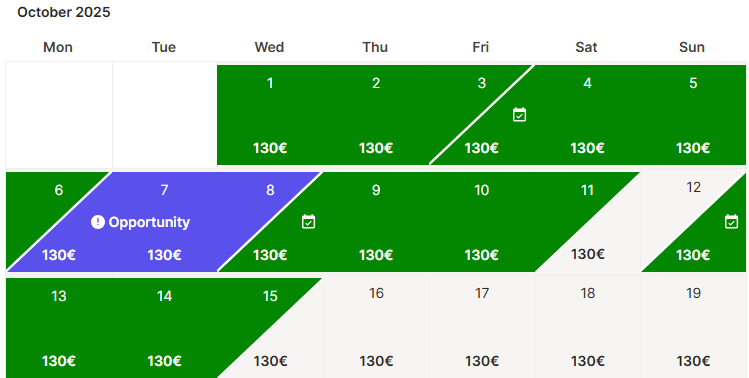
Holidu's Flexible Stays feature is a powerful tool that helps hosts maximize their rental income by making calendar gaps available for short-term bookings. These gaps—shown in purple on your calendar—represent nights that wouldn't normally be bookable due to your minimum-stay requirements or fixed check-in and check-out policies. By activating Flexible Stays, you can capture bookings you'd otherwise miss without changing your standard settings.
Understanding Calendar Gaps and Flexible Stays
Calendar gaps occur between your existing bookings when your current minimum-stay rules prevent guest check-ins or check-outs. For example, if you require a 7-night minimum stay, a 3-night gap between bookings remains unbookable. Flexible Stays temporarily overrides these restrictions for those specific nights, allowing you to accept shorter bookings at adjusted rates. This helps you reduce vacancy periods and increase your overall occupancy rate.
How to Activate Flexible Stays
You can activate Flexible Stays through two convenient methods: the Discounts section or directly from your Calendar. Both approaches lead to the same result.
Method 1: Activation via Discounts Section
- Log in to your Holidu account and select the property you want to configure
- Click on "Configuration" in the left-hand menu
- Scroll down and select "Discounts"
- Scroll to the bottom of the page to find the Flexible Stays section
- Click on "Configure"
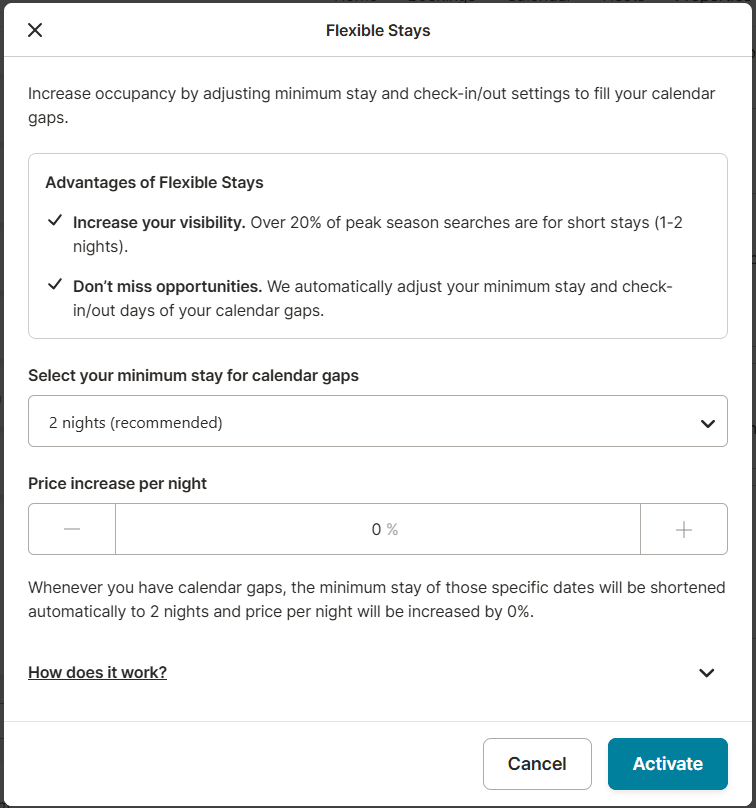
- Choose your minimum stay requirement: 1, 2, or 3 nights for the gap period
- Set your pricing: increase the nightly rate up to 50% above your current base price
- Click "Activate" to confirm and save your settings
Method 2: Activation via Calendar Section
- Navigate to your property's calendar view
- Click on the purple indicator showing the calendar gap
- Choose your preferred minimum stay length: 1, 2, or 3 nights
- Set your pricing adjustment: up to 50% increase over your standard nightly rate
- Click "Activate" to enable Flexible Stays for that gap
Key Benefits of Flexible Stays
- Increased Booking Opportunities: Convert previously unbookable gaps into revenue-generating nights, especially during high-demand seasons when guests search for short-stay options
- Capture Short-Stay Demand: Over 20% of peak-season searches are for stays of fewer than 7 nights. Flexible Stays helps you tap into this significant market segment
- Build Guest Reviews: Every completed booking provides an opportunity for guest feedback, helping improve your property rating and search visibility
- Improve Search Performance: Increased occupancy and bookable availability can positively impact your property's ranking in search results
- Reduce Manual Calendar Management: Eliminate the need to manually adjust your calendar settings for each individual gap
- Premium Pricing Strategy: Charge up to 50% more per night for these flexible bookings, offsetting the shorter stay length with higher nightly rates
Important Considerations Before Activating
- Gap-Specific Application: Flexible Stays only affects calendar gaps where your standard settings prevent bookings. It doesn't change your existing reservation policies
- Overrides Standard Settings: Once activated, this feature temporarily overrides your minimum-stay requirements and fixed check-in/check-out day policies exclusively for those gap nights
- Flexible Check-In and Check-Out: Guests booking Flexible Stays can check in and check out on any day within that period, providing maximum flexibility
- Special Pricing Application: Your adjusted pricing and stay rules apply only to the specific Flexible Stay booking period, not your entire calendar
- Calendar Visibility: Flexible Stay bookings appear tagged in your calendar for easy identification and tracking
- Easy Deactivation: You can deactivate or modify Flexible Stays settings at any time from the same configuration menu
- Manual Blocking Still Available: You retain the ability to manually block dates you prefer not to open for flexible bookings
Frequently Asked Questions
Can I exclude certain dates from Flexible Stays?
While Flexible Stays activates for all gaps matching your configuration, you maintain full control through manual date blocking. You can still block any specific dates you don't want to open for flexible bookings, giving you the flexibility to exclude dates during maintenance, personal use, or other circumstances.
Are calendar gaps visible to guests?
No, the purple gaps displayed on your calendar are only visible to you as the host. These markings serve as visual indicators to help you identify where bookings are currently being missed. Guests see only the available dates you've opened through Flexible Stays as regular bookable nights in your listing.
Can I change my Flexible Stays settings after activation?
Yes, you have complete control over your Flexible Stays configuration. You can update your minimum-stay requirements, adjust your pricing, or disable the feature entirely at any time. Simply return to either the Discounts or Calendar section and modify your settings as needed.
What happens if a guest books through Flexible Stays?
Once a booking is confirmed through Flexible Stays, the special pricing and stay rules apply exclusively to that reservation period. Your standard settings remain in place for all other bookings and calendar dates.
How does Flexible Stays pricing work?
You can set your Flexible Stays nightly rate at up to 50% higher than your base price. This premium pricing compensates for the shorter stay length while remaining attractive to guests seeking flexible accommodation options.
Do Flexible Stay bookings count toward my performance metrics?
Yes, all bookings—including Flexible Stays—contribute to your property's overall performance metrics, occupancy rate, and guest review opportunities. These bookings are treated as regular reservations in your booking history and statistics.
Can I set different Flexible Stays prices for different gaps?
The Flexible Stays feature applies consistent settings across all gaps on your calendar. Each gap can be individually activated with its own configuration, but once activated, the pricing and minimum-stay rules remain consistent until you change them.
Do you want to contact us?
We’re here to help. You can contact us directly if you need assistance or have questions.
Contact us